
Ethernet Statistics
To check the quality of the cable, navigate to Statistics > Ethernet.
The image below indicates the important areas of the statistics. 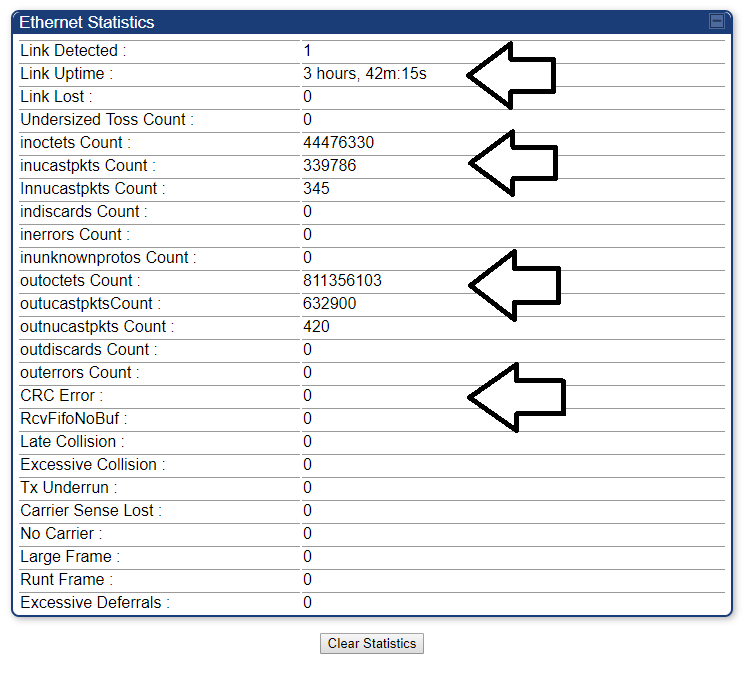
Link Detected, Link Uptime, Link Lost: These metrics refer to how many times a device has been plugged into the SM, and how long that connection has lasted.
inoctets Count: This refers to how many octets (small pieces of information) have been uploaded through the SM. These numbers will be in or over six figures when operating properly.
outoctets Count: This refers to how many octets have been downloaded through the SM. Look at this to see if traffic is running through the SM. These numbers will be in or over six figures when operating properly.
CRC Error, Carrier Sense Lost: Errors here indicate an issue with the cabling. Some (less than 500) errors are normal, but larger numbers indicate the residence needs to be re cabled. The cost of the labor can be comp’d, but the cable will be charged at 50 cents per foot.
Troubleshooting:
Link Issues: If you see larger than normal numbers for Link Detected/Lost, the SM is losing the connection to their router. It is possible this is due to a fault in either the cable, or the customer’s router. To test this, have the customer try plugging the cable into a laptop or desktop, and see if the issue persists. If it does, have the customer try unplugging and re-plugging everything, to ensure everything has a snug connection. If the issue still persists, schedule a service call.
CRC Error, Carrier Sense Lost: If you see these, the customer will need a service call.