
Download Link:
Prerequisites:
1) Python 3.7.2
Note: Script was written and tested on Python 3.7.2. Lower version of python will not work.
Use:
0) Install Python
In the downloaded folder, you’ll find Python 3.7.2. Install this with the default options. When you install Python, be sure to check the ‘Add to PATH’ checkbox, as shown below. 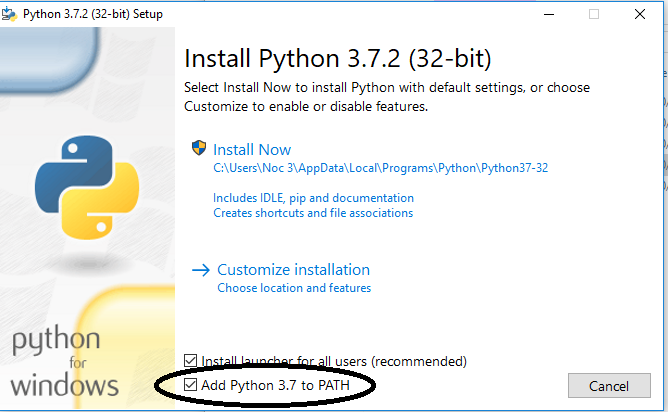
1) Required CSV files
To get the required CSV files for the script to run, export CSV files for the following reports:
- All Customer Geocodes
- Customers With Services
Save these two files in the same directory where the script is downloaded. You can see the two example .csv files in the directory.
2) Running the script
To run the script, click “run.bat”.
3) Using the script
The program will take a moment to run, then ask you for the tower site. It will then ask you for the latitude and longitude of the tower site.
The program will output spreadsheets for each access point found with that name.
4) Making the maps
To create the maps, use Google Mymaps. Then, create a new map.
Add layers for each of the sheets generated, then drag and drop the spreadsheet on it to import it.
To color code the points, click the text saying ‘Uniform Style’, then choose what styling you would like. Choose the style by data column, then choose the plan column, and the points will be colored by plan. They will be a different color for each plan (because reasons), so this may take some manual work to get perfect.
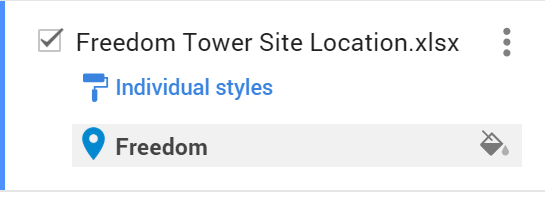
When you import the tower site location document, click the invisible style point button to on the far right side of the point. Click it, and change the icon to a star (or whatever your heart desires).
5) Naming the map, exporting
To name the map, click ‘Untitled Map’, and then change the name.
To export it, click the three dots to the right of the name of the map, then click ‘Export to KML/KMZ’, then export the map. The file will be opened in Google Earth, so this is the easiest way to do it.
6) Troubleshooting
If one of the sheets fails, for whatever reason, open up that network site and make sure the parent/child is configured correctly. If it is, try again. If that doesn’t work, good luck.