
New Installations – Renting
1) Lead Account Creation
Enter the customer’s information in Powercode, including the customer name, phone number, email address, address, referral information, and billing county even before checking the shot to their location. If we do not have their contact information, we cannot inform them if we build a new tower site in that area.
If it is unable to find the address, Powercode will give the message “Failed to calculate latitude and longitude”. If this problem occurs, verify the address, and try again.
If the issue persists, use google maps to find the address. To do this, search the address, then drop a pin on their house. When the pin is dropped, it will give the coordinates for that location. In the ‘Location’ tab, uncheck the ‘Automatically Geocode’ option, then enter the coordinates obtained from Google Maps.
2) Checking Their Location
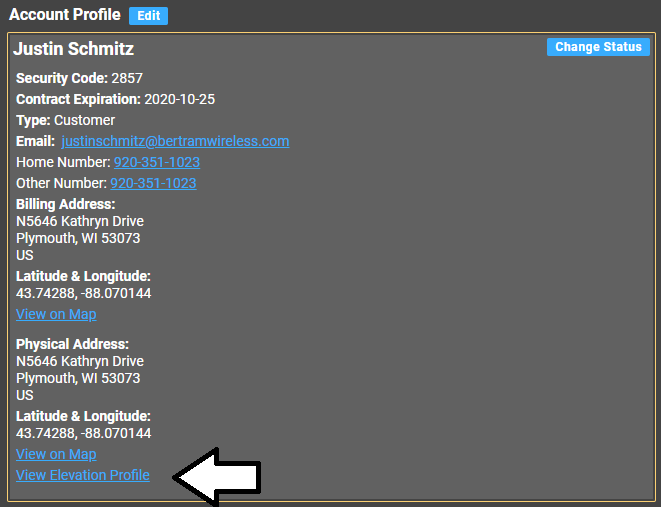
Once on the customer’s lead account page, click on ‘View Elevation Profile’.
3) Checking the shot to their location
Look on the graph for any obstructions, clicking to different tower sites to see if there is a clear shot to the location. Change the view from ‘Road’ to ‘Aerial’ to check for trees in the line of sight as well.
Ask the customer how tall their house is, then adjust the ‘Customer Height’ accordingly. Keep in mind that even a ten foot tripod with a ten foot pole will add, at most, sixteen feet.
If the customer has a silo or any tall buildings, we can mount on these as well, keeping in mind that we will need either a cable trenched from the mounting location to the house or a point to point setup.
A point to point (PTP) set up can be added to any installation package for a one time fee of $280.00. This includes the cost of the equipment as well as the installation. As long as the full installation fits in the standard 2.5 hr. install time, there is no additional charge. Any additional time is charged at $75.00/hr.
Generally speaking, the frequency of the Freedom 450 equipment is 5GHz, though the Shirley, Ashippun, Nordin North, and County C towers all use 2.4GHz.
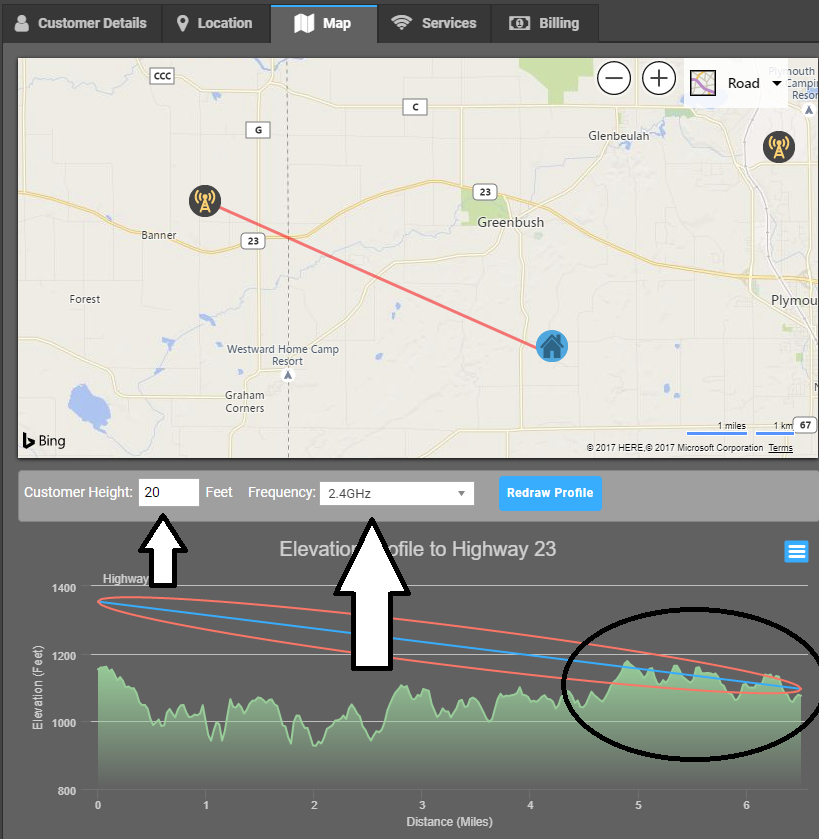
The Blue Line is the actual line of sight. This is the hypothetical path the signal should be taking.
The Red Oval is the Fresnel zone. This is the path the signal actually takes. In an ideal scenario, there is no obstruction of this zone, though mild obstruction may still be serviceable.
Tripods are available as well, in sizes of five, and ten feet, paired with a ten foot pole.
4) Rental Installation Details and Pricing
The following exclusively applies to customers who are renting their property.
Pricing for residential service plans is standard across counties. See the pricing cheat sheet for information.
If a customer mentions price matching, verify the customer is able to get the service of the other ISP, and verify the pricing information for the other ISP. Use common sense in price matching.
Rental customers have no service agreement, but they must sign the Terms of Service Contract. This protects us from liability.
The total price for an installation for a customer who is renting is $300.00.
$150.00 of this will be paid at time of scheduling the job, and the remaining $150.00 will be due at time of installation.
The second charge of $150.00 is made up of a $140 installation fee, and a $10.00 equipment rental fee.
There are no exceptions to this policy.
This includes the following:
- 2.5 Hours Installer Labor (add’l. labor charged at $75.00/hr.)
- 150′ cabling (add’l cable charged at ¢50/ft.)
If install fails, the initial $150.00 is refunded to the credit card.
Tripod Costs
There are two tripods that can be used for installation if needed, a five foot tripod and a ten foot tripod, both paired with a ten foot pole.
Note: Three foot tripods are no longer available.
- 5×10: $65.00
- 10×10: $160.00
5) Tower Speeds Spreadsheet:
Tower Speeds Spreadsheet: Use the following link when determining what speeds can be used on what towers for sales. Note: You will need this to be shared by one of our senior level techs. Provide them with your Bertram Communications email to gain access.
https://docs.google.com/spreadsheets/d/1Imt9ELIK0GgrCZ4fs37qHh0FGdl37z_rWUtP5svc2LY/edit#gid=0
6) Landlord Permission To Install
All customers who are renting must have written permission from their landlord giving us the rights to install at their location.
As an example:
“I [landlord name] give Bertram Internet permission to install service at the location [address] on the behalf of [customer name].”
7) Creating the job
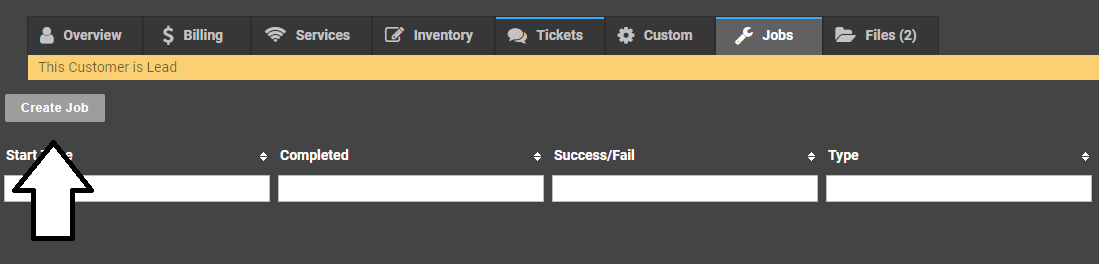
To create the job, click on ‘Jobs’ in powercode, then ‘Create Job’.
USE THE FOLLOWING TEMPLATES WHEN CREATING A JOB:
Install
Time:
Phone:
Plan:
Contract:
Roof:
Router:
Tower:
Tripod
Covid-Prescreen:
Tech Notes:
Upgrade
Time:
Phone:
Contract:
Plan:
Tower:
Roof:
Tripod:
Receive Power:
Pre-screening:
Tech Notes:
Service Call
Time:
Phone:
Cost:
Tripod:
LCT:
Roof:
Pre-screening:
Tech Notes:
Equipment Pick up
Phone:
Roof:
Tech Notes:
8) Scheduling
For tips on scheduling, see Scheduling.