
Plan Changes and Away Status
This guide will cover moving to a higher tier plan, moving to away status, and trialing a speed increase.
Use the following link when determining what speeds can be used on what towers for sales. Note: You will need this to be shared by one of our senior level techs. Provide them with your Bertram Communications email to gain access.
https://docs.google.com/spreadsheets/d/1Imt9ELIK0GgrCZ4fs37qHh0FGdl37z_rWUtP5svc2LY/edit#gid=0
For pricing information, see this article.
Moving to a different plan:
1) Adding Services Menu
With the customer’s page open, click on ‘Services’ in Powercode, then click on “Add Service”.
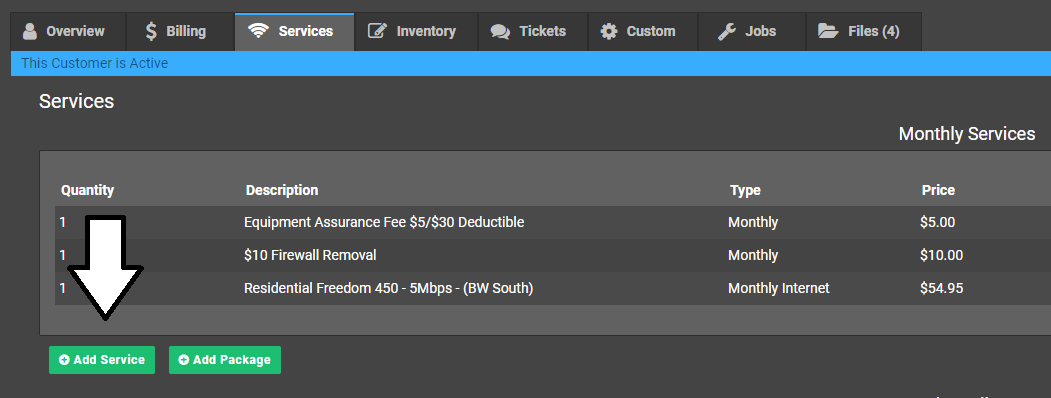
2) Selecting the new plan
Select the new plan in the menu for ‘Monthly Internet’, then add it. It’s possible to type in this field, to make finding the right one easier. Make sure you select the proper plan type – the correct region, and the correct account type (Residential or Commercial).
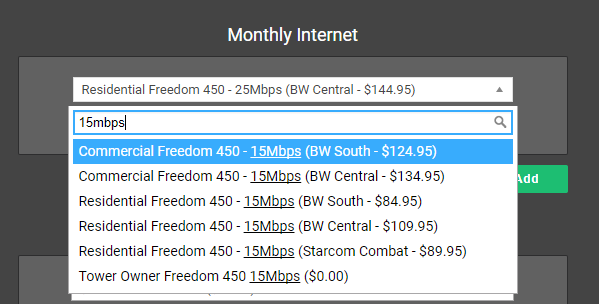
3) Adding the plan
To add the plan, click the new plan, then press ‘Add’. Pro-rating breaks up the internet to a daily basis, so if somebody is on a 5 meg plan for the first half of the month, then 25 meg for the second half, their bill will be the average of those prices weighted to the number of days.
Away Status
Moving to away status:
1) Adding Services Menu
With the customer’s page open, click on ‘Services’ in Powercode, then click on “Add Service”.
2) Selecting the new plan
Underneath ‘Monthly Internet’, in ‘Monthly’, click on the box and type ‘away’, then select ‘Away Status (With Assurance Plan) $9.00 Per Month ($9.00)’.
Note: If they are an account from the GraniteWave Migration, open their account and look at their historical billing. If they were previously charged at $5.00 for away status, charge them at that. 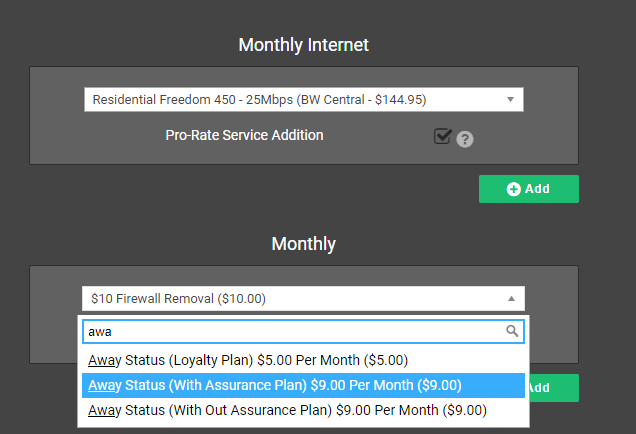
3) (Only for away status) Removing their existing service
Once you’ve added the away status, in the list of services, find the internet package and click on ‘Delete’. This will remove the service package. If there was a price override on the package, make a note of it on the account notes and call log for future reference.