
Equipment Upgrades
If a customer is on Liberty 100 equipment currently, and would like to move to the Freedom 450 service to be able to stream Netflix, Hulu, and use other intensive network applications, the procedure is similar to the process for a standard installation.
For pricing information, see this article.
1) Make sure there’s a 450 tower that they can connect to.
To check if the customer can get the higher-speed service, first check the elevation profile utility to ensure the tower they are connecting to supports 450.
If you are not sure how to check this, make sure you can change the frequency on the tower to 5 GHz in the utility.
Note: If you are attempting to upgrade users on Ashippun, County C, Nordin North, or on the Shirley Tower, the 450 service on these towers runs at 2.4 GHz.
2) Verify their signal strength is adequate
To check signal strength, open the customer’s current SM, and look at the signal strength. 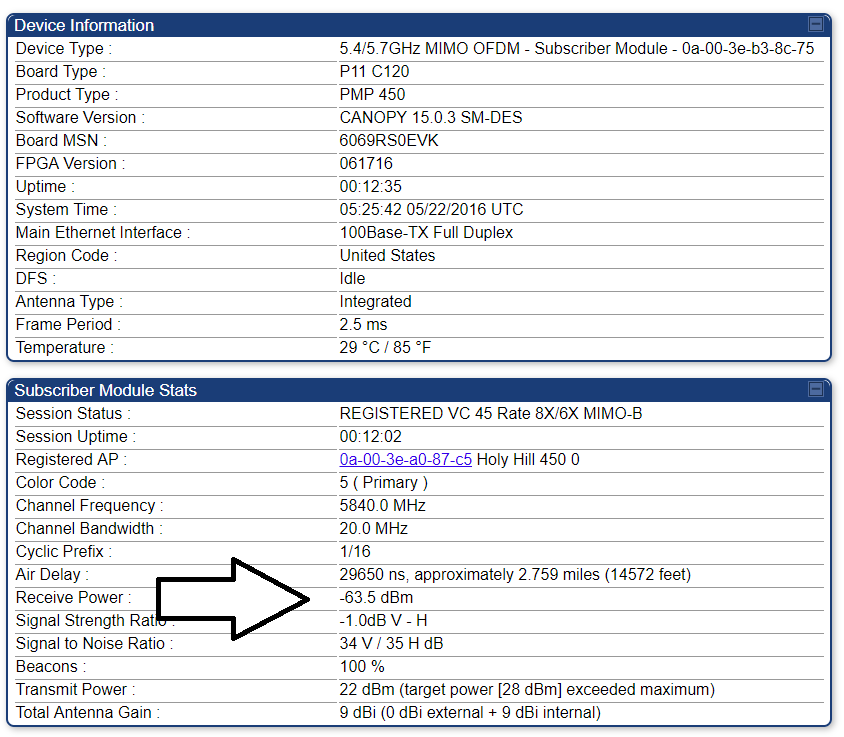
If this is low (-70 or worse), let the customer know the shot to 450 may be iffy, and they may need a tripod in order to have any hope of getting the upgrade.
3) Cost And Contract
There are two options for customers upgrading from Liberty 100 to the Freedom 450 system.
For customers who are looking to be upgrade with no contract, the following fees apply and will be paid at the next monthly billing cycle:
- $65.00 Legacy Equipment Upgrade
- Includes 2.5 hr. of installer labor (add’l labor charged at $75.00/hr.)
- $10.00 One-Time Rental Fee
Tripod Costs
There are two tripods that can be used for the upgrade if needed, a five foot tripod and a ten foot tripod, both paired with a ten foot pole.
Note: Three foot tripods are no longer available.
- 5×10: $65.00
- 10×10: $160.00
If the upgrade fails, there is no charge.
2) Three Year Service Agreement, Free Upgrade
For customers who are interested, we provide the option of a three year service agreement. In exchange for the agreement, we will waive all costs related to the upgrade (with the exception of PTP systems).
This includes:
- 3 hr. installer labor (add’l labor charged at $75.00/hr)
- 150′ cabling (add’l cable charged at ¢50/ft.)
- Tripod, either 5×10 or 10×10 at no cost
If the upgrade fails, there is no charge.
Note: The customer will be charged a one time $10.00 rental fee. This is a legal requirement and cannot be waived.
If the customer terminates service before their contract expires, they will be charged a $350.00 Early Termination Fee (ETF).
4) Customer Routers
Managed Routers
As an additional service, Bertram Internet sells managed routers. These are routers that we own and control, and will support remotely as well as replace if needed.
With managed routers, the customer doesn’t have to worry about setting up the router themselves, or changing any settings; we’re able to take care of everything over the phone. This also ensures they have a high quality router, and won’t have any problems with signal strength that they may have with cheaper routers.
These routers come with a initial fee of $40.00, then a monthly recurring fee of $7.00.
We will replace the router (110$ value) up to once per year at no cost.
Customer Sourced Routers
Alternatively, the customer can purchase their own router. For a typical family in an average home, an Asus router in the 60 to 80 dollar range will do for most. A typical router has a lifespan of 1 to 2 years, so there’s no point in buying more than they need.
5) Scheduling the Upgrade
When scheduling an upgrade, the customer needs to be on site for it, so schedule accordingly. See Scheduling for more information.